How do you set a stop loss with ATR in MT4?
Updated 2026-06-09
Setting an ATR stop in MT4 takes three steps: read the Average True Range value from the Data Window, convert price units into pips — on a 5-digit broker EURUSD's 0.00184 is 18.4 pips, not 184 points — multiply by your chosen multiple, and subtract the result from your entry price. The multiplier itself is risk arithmetic, not folklore.
Setting a stop loss with ATR is a three-step job
You are not here for a definition, you are trying to place a stop at a distance the market's recent movement actually justifies. On MetaTrader 4 that is three concrete steps, and every one of them is arithmetic you can check.
- Read the ATR value. Attach the built-in Average True Range indicator (Insert, then Indicators, then Oscillators, then Average True Range), open the Data Window with Ctrl+D, and hover the bar you care about. The figure shown is in the symbol's raw price units, which matters enormously in step two.
- Convert it to a usable distance. The raw number is not pips on most modern broker feeds. Getting this conversion right is where ATR stops most often go silently wrong, and two sections below pin down the exact rules.
- Multiply and place. Multiply the converted distance by your multiple, subtract it from your entry for a long or add it for a short, and type that price into the order's Stop Loss field. MT4 takes the stop as a price level, not as a distance, so the subtraction is on you.
That is the whole job. The rest of this guide checks each step against what MetaTrader 4 verifiably does: what the ATR number actually is, the digit convention that produces stops ten times too wide or too tight, how the multiple connects to cash risk, and what the platform's native trailing stop can and cannot do once the order is live.
The number you are reading is averaged True Range, with one MT4 quirk
The value in the Data Window comes from Welles Wilder's True Range. For each bar, True Range is the largest of three distances: high minus low, the absolute gap between the high and the previous close, and the absolute gap between the low and the previous close. The previous-close comparisons exist so that a gap between bars counts as movement even when the bar's own range is small. ATR is then an average of True Range over the lookback period, 14 by default in MT4's built-in indicator.
One quirk worth knowing: Wilder's original calculation smooths recursively, blending each new True Range into the prior figure as (prior ATR × 13 + TR) / 14. The ATR.mq4 that ships with MetaTrader 4 instead takes a simple moving average of True Range over the period; its own source code comments that the values are "simply averaged". The two methods converge closely but are not always identical, so if MT4's readout differs slightly from a textbook calculation or another platform, that is why. Neither is broken.
Two practical consequences follow. First, ATR for a closed bar never changes after the fact. It is computed from completed highs, lows and closes, so it does not repaint; only the reading on the still-forming bar drifts until that bar closes, and if you size from the live bar you are sizing from an unfinished number. Second, the value is denominated in the symbol's quote price units, 0.00184 on EURUSD or 0.184 on USDJPY, and that is exactly where the digit trap begins.
Pips vs points: the 4-digit vs 5-digit display trap
MetaTrader brokers quote most forex pairs to either four or five decimal places, and yen pairs to two or three. The pip, the unit stop distances are usually discussed in, is the fourth decimal on standard pairs and the second decimal on yen pairs. On a 5-digit feed the fifth decimal is a point, one tenth of a pip. The ATR readout does not know which unit you are thinking in; it just prints price units:
- On a 4-digit broker, an EURUSD ATR of
0.0018reads directly as 18 pips. - On a 5-digit broker, the same market prints
0.00184: 18.4 pips, or 184 points. - On a 3-digit yen feed, a USDJPY ATR of
0.184is 18.4 pips, because a yen pip is 0.01.
The classic mistake is mixing the two unit systems. Treating 184 points as 184 pips produces a stop ten times too wide; the reverse error, a stop ten times too tight. MT4 itself adds to the confusion because server-side values such as minimum stop distances are expressed in points, while most trading writing talks in pips.
Turning the converted figure into an actual stop is one subtraction: long at 1.08500, ATR 18.4 pips, a multiple of 2 taken purely for arithmetic's sake, gives a distance of 36.8 pips = 0.00368, so the stop price is 1.08500 − 0.00368 = 1.08132. For a short, add instead. Tools that automate the conversion typically assume a 5-digit/3-digit feed: the No Nonsense ATR panel, for example, divides the raw value by ten to get pips, which is exactly right on five digits and exactly ten times off on a genuine 4-digit feed, so sanity-check unusual symbols.
"Which multiplier?" is an arithmetic question, not folklore
Search results want to hand you a magic number. There is not one that can be verified, so here is what is checkable instead: the multiplier is one factor in a three-factor equation, and the equation is the real answer.
cash at risk = stop distance in pips × pip value per lot × lots
Work the example through. ATR reads 18.4 pips. A multiple of 1 puts the stop 18.4 pips away; a multiple of 2 puts it 36.8 pips away. On any pair where the US dollar is the quote currency, EURUSD or GBPUSD for instance, one pip on one standard lot is worth $10, so those stops put $184 and $368 per standard lot on the line, $18.40 and $36.80 per mini lot, $1.84 and $3.68 per micro lot. For pairs with another quote currency the pip value floats with exchange rates; the free Lot Size Calculator panel does the per-symbol pip-value and lot arithmetic on the chart, and the Risk Calculator totals the resulting cash exposure across every open position.
Two mechanical facts fall out of the equation:
- The multiple does not set your risk, lots do. Double the multiple and halve the lot size and the cash at risk is identical; only the stop's location relative to normal fluctuation changes.
- What the multiple actually trades off: a wider stop sits further outside ordinary bar-to-bar movement, so routine noise reaches it less often, and each time it is reached it costs more pips. A tighter stop reverses both sides. That is geometry, not a recommendation.
For reference rather than prescription: the No Nonsense ATR indicator ships with a stop multiplier default of 1.5 and a target multiplier of 1, the configuration common in NNFX circles. Whether any multiple suits your method is something to establish on a demo account, not to take from a guide.
MT4's native trailing stop: what it verifiably does, and where it stops
MetaTrader 4 has a built-in trailing stop: right-click an open order in the Terminal window (Ctrl+T), choose Trailing Stop, and pick a distance. Before trusting it with a live position, know the mechanics, because every one of these is platform behaviour, not opinion:
- It runs in your terminal, not on the broker's server. The trailing logic lives in the client. Close MetaTrader, shut the laptop, drop the connection, and the trail freezes. The last stop loss it placed stays active at the broker, but it stops following price. This is why traders who lean on trailing stops keep the terminal running continuously, often on a VPS.
- The distance is set in points, not pips. On a 5-digit broker the menu's "15 points" is 1.5 pips. The preset list runs from 15 to 50 points plus Custom, and 15 points is the minimum the terminal accepts; it will not trail tighter than that.
- It only starts working in profit. The terminal places its first automatic stop modification once the position is in profit by at least the trail distance. After that it ratchets, following price tick by tick at the set distance, and it never moves the stop backwards.
- Your broker's stop level still applies. Brokers enforce a minimum distance from current price for stop orders, and if that is wider than your trail setting, modifications are rejected. The limit is broker-specific, so check yours.
"When trailing hurts" is mechanical, not mystical. A trail set tighter than the bar-to-bar movement ATR is measuring sits inside ordinary fluctuation, and ordinary fluctuation will close the position. A trail also concedes roughly its own distance back from any peak, and sometimes more, because a triggered stop fills at the next available price; a gap over the level fills beyond it.
Doing the whole job on the chart, without a calculator
Every step above is hand-checkable, which was the point, but running the read-convert-multiply loop manually on every trade gets old. The No Nonsense ATR indicator automates exactly this job and nothing else: a free, open-source (GPL-3.0) MT4 panel that reads Average True Range, converts it to pips, applies separate stop and target multipliers, and prints the resulting distances in a corner of the chart. Click the chart and it draws the stop and target lines at those distances for both the long and the short case, so you can see where an ATR-sized stop actually lands before placing anything. It also offers an optional readout that turns the ATR stop and a risk figure into a lot size, the same arithmetic from the multiplier section, done for you.
The honest limits, straight from its own page: it is a calculator and a display, not a signal. It tells you how wide, never when or which way. The pip conversion assumes a standard 5-digit/3-digit broker. The input list is long and cluttered, though most people only ever touch the ATR periods, 14 by default to match the built-in indicator, and the two multipliers. And it is MT4-only; there is no MT5 build of the file.
If you grab it, installation is the standard data-folder routine. The step-by-step install guide covers it in under a minute, and the indicator-not-showing guide exists for the day the Navigator refuses to cooperate. The download includes the full .mq4 source, so everything this guide says about what it computes is checkable in the file itself.
ATR stop loss questions
How do I read the ATR value in MT4?
Attach the built-in Average True Range indicator, open the Data Window with Ctrl+D, and hover any bar; the ATR line's value appears there in raw price units. Convert before using it: on a 5-digit broker, EURUSD's 0.00184 means 18.4 pips, not 184, and on a 3-digit yen feed a USDJPY reading of 0.184 is also 18.4 pips because a yen pip is 0.01.
What is the best ATR stop loss multiplier?
There is no verifiable universal number, and this guide will not invent one. The multiplier scales one factor in the equation cash risk equals stop pips times pip value times lots, so any multiple can produce any cash risk once lot size adjusts. What changes is where the stop sits relative to ordinary bar-to-bar movement. The No Nonsense ATR tool defaults to 1.5 for the stop, a common NNFX configuration, not a recommendation. Test multiples on a demo account against your own method.
Does MT4's trailing stop keep working when the terminal is closed?
No. The trailing stop is executed by the client terminal, not the broker's server. When MetaTrader 4 is closed or disconnected the trail stops updating; the last stop loss it placed remains active at the broker, frozen at that level. That is platform behaviour, not a broker setting, and it is why traders who rely on trailing stops keep the terminal running continuously, often on a VPS.
Why is my ATR-based stop ten times too wide?
Almost certainly a points-versus-pips mix-up. On a 5-digit broker the fifth decimal is a point, one tenth of a pip, so an EURUSD ATR of 0.00184 is 184 points but only 18.4 pips. Treat points as pips and every distance inflates tenfold; make the reverse mistake and stops come out ten times too tight. Check how many digits your broker quotes before converting; it is the single most common ATR-stop error on MetaTrader 4.
Free tools to start with
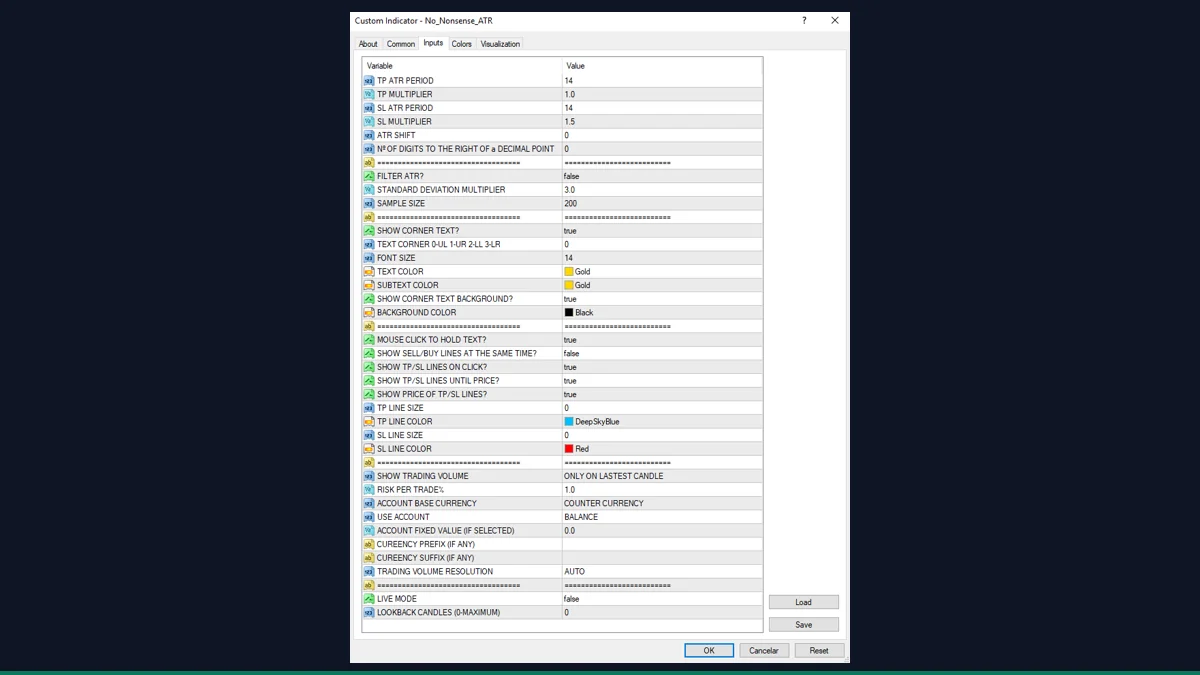
No Nonsense ATR
An ATR readout in pips for the NNFX method, sizing stops and targets off real volatility.
Lot Size Calculator
Risk-based position sizing on the chart: set risk percent and stop distance, read the exact lot size.
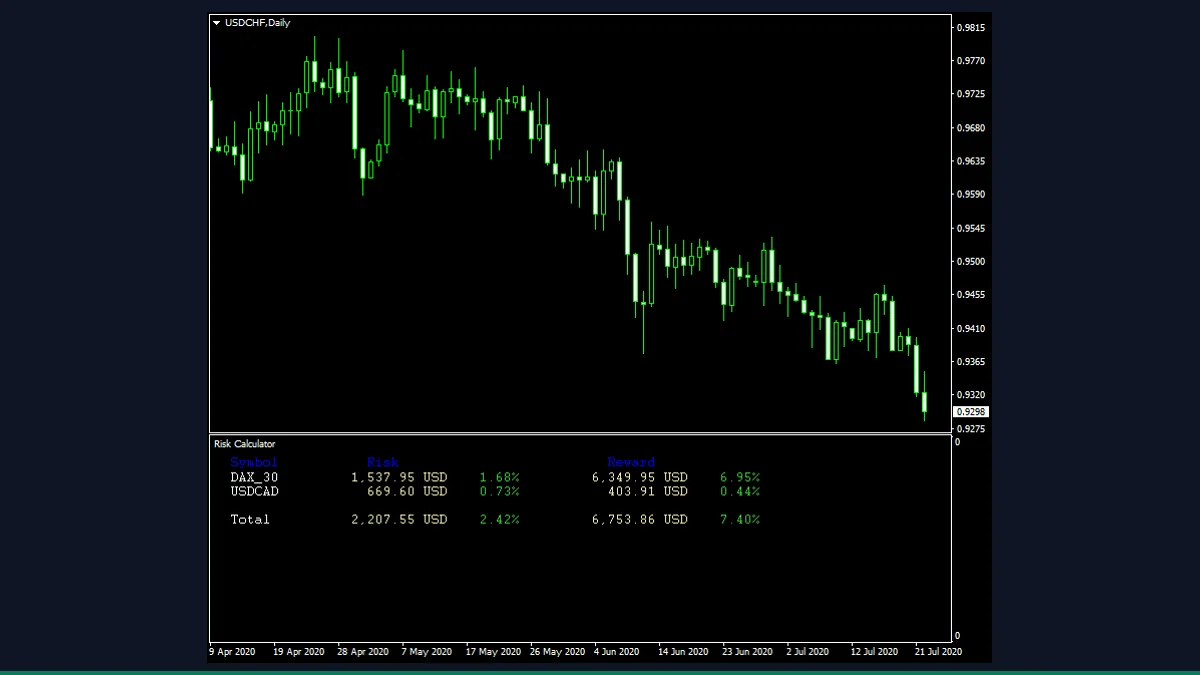
Risk Calculator
Reads your open and pending orders to show total risk and reward in both money and percent.