MT4 Risk Calculator Indicator
- Category
- Account & Trade Tools
- Platform
- MetaTrader 4, MetaTrader 5
- Repaints?
- No, updates on closed bars
- Licence
- Apache-2.0
- Inputs
- 10
- Price
- Free
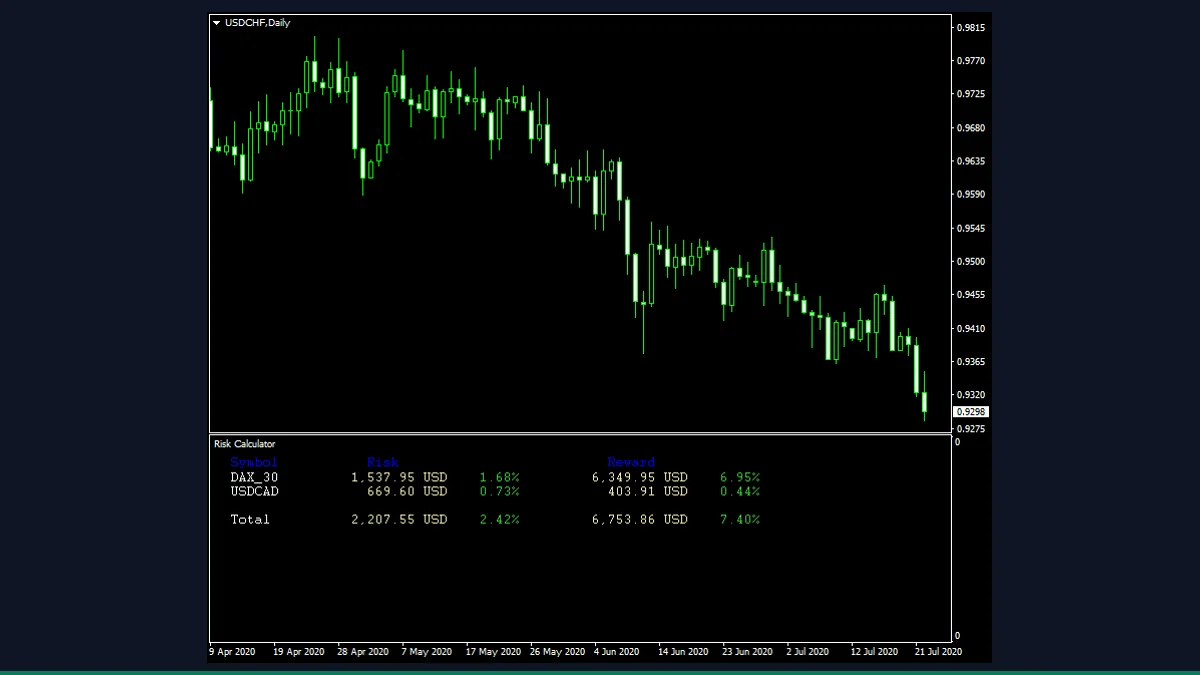
The Risk Calculator is a free MT4 and MT5 indicator from EarnForex that reads every open position and pending order on your account, then totals your maximum risk and potential reward in both account-currency money and percent. It is for traders who want one clear number for how much is on the line.
If you run several trades at once, working out your true total exposure in your head is slow and error-prone. The Risk Calculator does the arithmetic for you. It scans your open and pending orders, looks at their stop-loss and take-profit levels, and prints your combined risk and reward straight onto the chart in a separate window.
What is Risk Calculator, and what does it do in MT4?
The Risk Calculator is an account utility for MetaTrader 4 and MetaTrader 5, published by EarnForex under the Apache-2.0 licence. It is not a signal indicator and it does not try to predict where price is going. Instead it is a reading tool: it inspects the orders already on your account and reports a single, consolidated picture of how much money you stand to lose if every stop-loss is hit and how much you stand to make if every take-profit is hit.
It works per symbol and as a grand total, so you can see both the risk on each currency pair you hold and the overall risk across the whole account, expressed in your deposit currency and as a percentage of your balance or equity.
On every tick the indicator loops through your open positions and pending orders. For each one it reads the volume, the entry or trigger price, the stop-loss and the take-profit, then converts the distance between price and those levels into account-currency money using the symbol's tick value. Summing these gives your total potential loss (risk) and, if you enable it, your total potential gain (reward). The percentage figures are that money divided by your account balance, or by equity if you switch UseEquityInsteadOfBalance on.
Because real losses include more than just the stop distance, the tool can fold in extra costs: spread (CalculateSpreads), accrued swaps (CalculateSwaps), and a per-lot commission you enter manually (CommissionPerLot). It can also draw a stop-out price line on the chart so you can see roughly where your broker would start force-closing positions. Orders with no stop-loss are flagged because their risk is effectively undefined.
The figures update live as price moves and as you add, modify, or close orders. The maths is deterministic from the current order book, so nothing repaints in the misleading sense. The author does note known limitations: results can drift when the symbol's quote currency differs from your account currency, very large numbers of pending orders can slow processing, spread is assumed constant on each tick, and correlations and slippage are not modelled.
Which Risk Calculator inputs matter most?
The inputs are grouped into Main, Font, Spacing, Reward, and Stop-out level. These are the settings most traders actually touch.
| Input | Default | What it controls |
|---|---|---|
| CalculateSpreads | true | Folds the spread cost into your potential maximum loss so the risk figure reflects what you really pay to be in the trade. |
| CalculateSwaps | true | Adds any swaps already accrued on your open positions into the risk total, useful if you hold trades overnight. |
| CommissionPerLot | 0 | Your broker's one-side commission per lot in account currency. Enter it manually so the risk includes commission costs. |
| UseEquityInsteadOfBalance | false | When true, percentage figures are based on account equity rather than balance, so floating profit and loss is included in the denominator. |
| SeparatePendingOpenCalculation | false | Splits the output so risk on pending orders is shown separately from risk on already-open positions instead of one combined number. |
| CalculateReward | false | Turns on the reward side, totalling your potential gain from take-profit levels alongside the risk figures. |
| ShowRiskRewardRatio | false | Displays the risk-to-reward ratio. Only has an effect when CalculateReward is set to true. |
| FontSize | 8 | Size of the on-chart text. Raise it if the readout is hard to read on a high-resolution monitor. |
| offsetX | 20 | Horizontal pixel offset of the readout from the window edge, for positioning the panel where it does not block price. |
How do you add Risk Calculator to MetaTrader 4?
- Download and unzip the Risk Calculator archive from the source.
- In MetaTrader 4, open File then Open Data Folder.
- Open the MQL4 folder, then Indicators, and copy the indicator file from the zip into it.
- Copy the included .mqh files from the zip into MQL4/Include so the indicator can compile.
- Back in MetaTrader, right-click Navigator and choose Refresh, or restart the terminal.
- Drag the Risk Calculator from the Navigator onto any chart and click OK in the inputs window.
- Read the totals in the indicator's separate window below the price chart.
Where does Risk Calculator help, and where does it fall short?
What Risk Calculator does well, and where it falls short, with nothing hidden.
- Free and open-source under the Apache-2.0 licence, works on both MetaTrader 4 and MetaTrader 5.
- Gives one consolidated view of total risk and reward across every open and pending order, per symbol and account-wide.
- Shows the numbers in both account-currency money and percent, and can include spread, swap, and commission costs for a realistic figure.
- Flags positions that have no stop-loss, so you can spot undefined-risk trades at a glance.
- Optional stop-out price line shows roughly where the broker would begin force-closing positions.
- Updates live and does not repaint in the misleading sense, since it only reports your current order book.
- It is an account utility, not a predictor. It reports your existing exposure and does not generate entry or exit signals.
- Results can be inaccurate when the symbol's quote currency differs from your account currency, by the author's own admission.
- A very large number of pending orders with stops and targets can slow processing on each tick.
- Commission is not read automatically. You have to enter CommissionPerLot yourself, and a wrong value makes the risk figure wrong.
- It assumes constant spread on each tick and ignores slippage, correlations, and lack of margin, so figures are an estimate rather than a guarantee.
- Trades with no stop-loss cannot have a defined risk, so the total is only meaningful when your orders actually have stops.
Download Risk Calculator free
Enter your email and we will send you Risk Calculator for MetaTrader 4, packaged with its original Apache-2.0 licence and a credit to EarnForex.com. Come back for any of the other free tools whenever you want one.
We never share or sell your email. One-click unsubscribe in every message.
Risk Calculator: questions traders ask
Does the Risk Calculator place or close trades?
No. It is a read-only display utility. It looks at the orders already on your account and shows the totals. It never sends, modifies, or closes any order.
Does it repaint?
Not in the misleading sense. It does not draw historical signals that move later. The figures are calculated directly from your current open and pending orders and update live as those orders and prices change.
Does it work on MetaTrader 5?
Yes. The download includes both an MT4 (.mq4) and an MT5 (.mq5) version of the indicator, so it runs on either platform.
Is it really free?
Yes. It is published by EarnForex under the Apache-2.0 open-source licence, so you can download, use, and study the source code at no cost.
Why does it need .mqh files in the Include folder?
The indicator is split across several helper files (its order-iteration logic lives in .mqh includes). If you copy only the main indicator file, it will fail to compile. Copy the Include files from the zip into MQL4/Include as well.
My risk numbers look off. Why?
The most common causes are trades without a stop-loss (which have no defined risk), a symbol whose quote currency differs from your account currency, or a missing CommissionPerLot value. Set stops, enter your commission, and check that limitation note before relying on the figure.