Breakeven Line for MetaTrader 4
- Category
- Account & Trade Tools
- Platform
- MetaTrader 4, MetaTrader 5
- Repaints?
- No, updates on closed bars
- Licence
- Apache-2.0
- Inputs
- 2
- Price
- Free
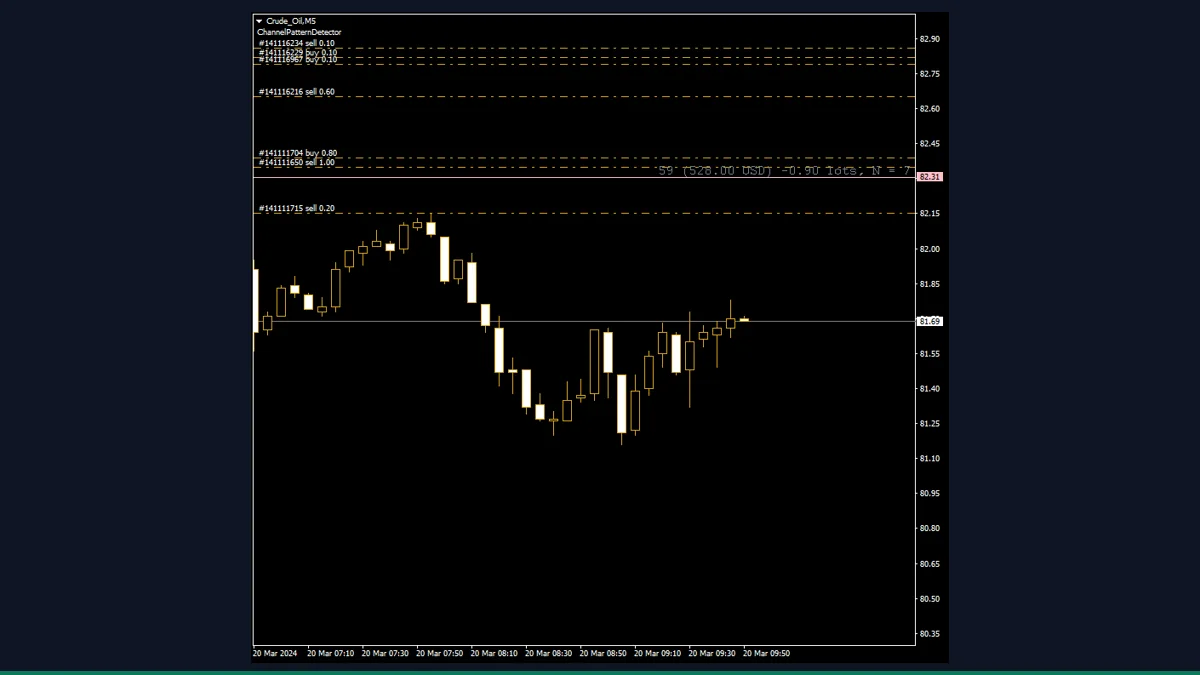
Breakeven Line is a free MT4 breakeven indicator from EarnForex that draws a horizontal line at the exact price where your open positions in the current symbol break even after swap and commission. It also shows net profit, net lots, and position count. Useful for anyone managing several orders at once.
If you have several open orders on the same pair and want to know the one price where the whole basket goes flat, Breakeven Line draws it for you. It is a display utility, not a signal generator, and it accounts for swap and commission, not just raw entry prices.
What is Breakeven Line, and what does it do in MT4?
Breakeven Line is a free, Apache-2.0 licensed MetaTrader 4 indicator by www.EarnForex.com, 2024-2025. It reads every open order on the chart's current symbol and draws a single horizontal line at the combined breakeven price, the level where the floating profit and loss of all those positions nets to zero after costs.
It is purely informational. It does not open, close, or modify trades, and it does not predict where price will go. Think of it as a live readout of your current exposure on one symbol, plotted directly on the chart so you can see your breakeven point next to the candles instead of doing the math in your head.
On a timer that fires five times per second, the indicator loops through all open orders, keeps only the ones matching the chart symbol, and separates them into longs and shorts. It builds a volume-weighted average entry for each side and sums the floating result of every order, including OrderProfit, OrderSwap, and OrderCommission. So the line reflects true breakeven after carry and fees, not a naive average of entry prices.
It then converts that aggregated profit or loss into a price distance using the symbol's point value, currency-adjusted to your account currency, and offsets from the current Bid or Ask to find the breakeven price. The net direction decides which way the offset goes and which color the line takes: net long, net short, or fully hedged neutral. The result is drawn as a horizontal line (OBJ_HLINE) with a label showing the distance in points, the net profit in your account currency, net lots, and the number of positions (N).
Because it only reports the state of orders that already exist, it never repaints in the misleading sense. The line simply moves as your floating P/L changes with price, swap accrual, and any orders you add or close.
Which Breakeven Line inputs matter most?
Breakeven Line works out of the box, so most inputs are cosmetic. The two that change behavior are IgnoreLong and IgnoreShort. Here are the most useful settings.
| Input | Default | What it controls |
|---|---|---|
| IgnoreLong | false | When true, long orders are excluded from the calculation so the line reflects only your short positions on the symbol. |
| IgnoreShort | false | When true, short orders are excluded so the line reflects only your long positions. Handy when you hedge and want one side at a time. |
| line_color_buy | clrTeal | Color of the breakeven line when your net position on the symbol is long. |
| line_color_sell | clrPink | Color of the line when your net position is short. |
| line_color_neutral | clrSlateGray | Color used when net volume is zero (fully hedged), where breakeven is set by accumulated swap and commission. |
| line_style | STYLE_SOLID | Drawing style of the line: solid, dashed, dotted, and so on. |
| line_width | 1 | Thickness of the breakeven line in pixels. |
| font_size | 12 | Size of the label text that shows points, profit, net lots, and position count. |
| font_face | Courier | Font used for the on-chart label. |
| ObjectPrefix | BEL_ | Prefix for the chart objects this indicator creates, so they do not clash with other indicators or EAs. |
How do you add Breakeven Line to MetaTrader 4?
- Download and unzip the indicator archive to a folder you can find.
- In MetaTrader 4, click File then Open Data Folder.
- Open MQL4, then the Indicators folder.
- Copy the indicator file from the zip into MQL4/Indicators (if the zip includes any .mqh files, copy them into MQL4/Include).
- Back in MT4, right-click Navigator and choose Refresh, or restart the terminal.
- Drag Breakeven Line from Navigator onto the chart of the symbol you are trading.
- Click OK; the line appears once you have open orders on that symbol, and Shift+B toggles it.
Where does Breakeven Line help, and where does it fall short?
What Breakeven Line does well, and where it falls short, with nothing hidden.
- Calculates true breakeven after swap and commission, not just an average of entry prices
- Handles multiple orders, grids, and partial scaling on the symbol automatically
- Updates live five times per second, and the Shift+B hotkey hides or shows the line instantly
- Color coding plus the label (points, profit, net lots, N) gives a fast read of your exposure
- Free, open source under Apache-2.0, and runs on both MT4 and MT5
- Does not repaint in any misleading way, since it only reports orders that already exist
- Only considers orders on the chart's current symbol, so it ignores positions on other pairs
- It is a display tool, not a trade manager: it will not move stops to breakeven or close anything for you
- Counts only open market orders, not pending orders, so a grid of limits is not reflected until they fill
- The frequent timer redraw is light but does add a small constant load per chart it runs on
- Net-zero hedged accounts show a breakeven driven only by costs, which can be unintuitive at first
- No alerts or notifications when price reaches the breakeven level
Download Breakeven Line free
Enter your email and we will send you Breakeven Line for MetaTrader 4, packaged with its original Apache-2.0 licence and a credit to EarnForex.com. Come back for any of the other free tools whenever you want one.
We never share or sell your email. One-click unsubscribe in every message.
Breakeven Line: questions traders ask
Does Breakeven Line repaint?
No. It only reads orders that are already open and plots their combined breakeven price. The line moves as your floating profit and loss changes, but it never rewrites past values to look better than they were.
Does it place or manage trades?
No. It is a display-only indicator. It does not open, close, or modify positions, and it will not auto-move your stop to breakeven. You act on the information yourself.
Does it include swap and commission in the breakeven price?
Yes. It sums OrderProfit, OrderSwap, and OrderCommission for every open order on the symbol, so the line is your true cost-adjusted breakeven, not just an average entry price.
Does it work on all my open trades across pairs?
No. It only considers orders on the chart's current symbol. To see breakeven on another pair, attach the indicator to that pair's chart.
Is it really free, and does it work on MT5?
Yes on both counts. It is open source under the Apache-2.0 license from EarnForex, and the same tool is provided for both MetaTrader 4 and MetaTrader 5.
Why is the line gray and not near my entries?
Gray (neutral) means your net volume on the symbol is zero, fully hedged. In that case breakeven is set only by accumulated swap and commission, so the line sits a small distance away from price.