Stop-Out Line Indicator for MT4
- Category
- Account & Trade Tools
- Platform
- MetaTrader 4, MetaTrader 5
- Repaints?
- No, updates on closed bars
- Licence
- Apache-2.0
- Inputs
- 1
- Price
- Free
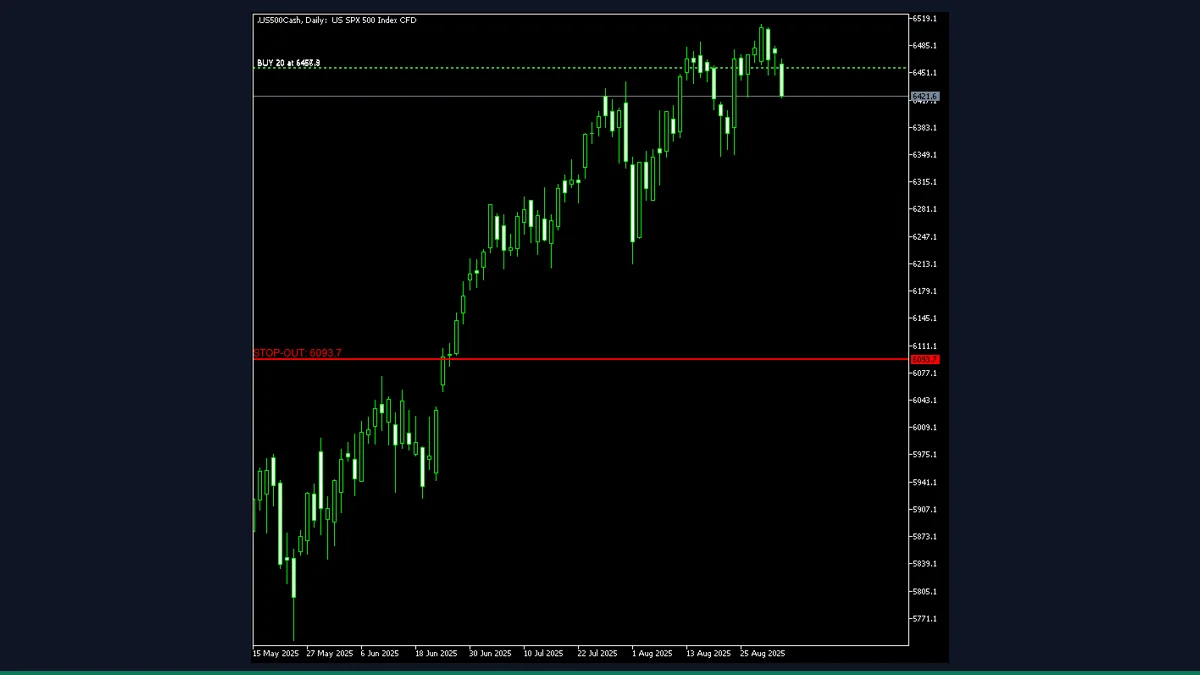
Stop-Out Line is a free MT4 and MT5 utility from EarnForex that draws a horizontal line at the price where your account equity would fall to the broker's stop-out level for your open positions on the current symbol. It is for traders running margin-heavy positions who want a visible danger price on the chart.
If you trade with meaningful margin usage, the one number you rarely see plotted is the price at which the broker starts force-closing your trades. Stop-Out Line calculates that price for the current symbol and draws it directly on the chart, updating live as equity and positions change.
What is Stop-Out Line, and what does it do in MT4?
Stop-Out Line is an account and trade utility for MetaTrader 4 and MetaTrader 5, published by www.EarnForex.com, 2025 under the Apache-2.0 licence. It is not a signal or a market-prediction tool. It is a risk-awareness overlay that answers a single, practical question: at what price on this symbol would my equity drop to the broker's stop-out threshold and trigger a forced liquidation?
It reads your live account state, your broker's stop-out settings, and your net open position on the charted symbol, then plots a single horizontal line (with an optional price label) at the calculated stop-out price. When you have no open position on that symbol, the line disappears.
On every tick and on a fast millisecond timer, the indicator pulls your AccountEquity, AccountMargin, the broker's stop-out level (AccountStopoutLevel), and the stop-out mode (AccountStopoutMode, which is either a percentage of margin or a free-margin value in account currency). It then loops through your open market orders, keeps only the ones on the current symbol, and nets the buy and sell lots to determine direction (net long or net short) and size.
From there it computes the equity you would have at the stop-out point, subtracts that from current equity to get the maximum loss you can absorb, and converts that loss into a price distance using a per-point value for the symbol (with currency-conversion handling when the profit currency differs from your account currency). That distance is applied below the current Bid for net-long positions and above the current Ask (adjusted for spread) for net-short positions, giving the stop-out price. The result is drawn as a horizontal line and a left-anchored text label.
Because the figure is driven by live equity, margin, and net lots, the line moves whenever you add to a position, partially close, or your floating P/L shifts the equity. It reflects the current state of your account, not a forecast of where price will go. Press Shift+S to hide or show the line.
Which Stop-Out Line inputs matter most?
The defaults work out of the box. The inputs below only change how often the line recalculates and how the line and label look on the chart.
| Input | Default | What it controls |
|---|---|---|
| UpdateFrequencyMs | 100 | How often, in milliseconds, the stop-out price is recalculated on the timer. 100 ms gives a near-live line. Raise it if you want to ease the load on a slow machine. |
| LineColor | clrRed | Colour of the stop-out horizontal line and its price label. Red by default to read as a danger level. |
| LineWidth | 2 | Thickness of the stop-out line in pixels. |
| LineStyle | STYLE_SOLID | Line style: solid, dashed, dotted, and so on, using the standard MT4 line styles. |
| ShowLabel | true | Shows a text label with the stop-out price on the left edge of the visible chart. Set to false for a clean line only. |
| LineLabel | STOP-OUT: | The text prefix printed before the price on the label. Change it to whatever wording you prefer. |
How do you add Stop-Out Line to MetaTrader 4?
- Download and unzip the Stop-Out Line archive from the download link.
- In MetaTrader 4, open File then Open Data Folder.
- Open the MQL4 folder, then the Indicators folder.
- Copy the indicator file from the zip into MQL4/Indicators.
- Back in MT4, right-click Indicators in the Navigator panel and choose Refresh.
- Drag Stop-Out Line from the Navigator onto the chart of the symbol you are trading and confirm the inputs.
- With an open position on that symbol, the red stop-out line and label appear; press Shift+S to hide or show it.
Where does Stop-Out Line help, and where does it fall short?
What Stop-Out Line does well, and where it falls short, with nothing hidden.
- Plots a concrete, account-specific danger price instead of leaving you to guess where a margin call sits.
- Updates live as equity, floating P/L, and net lots change, so the line tracks your real exposure.
- Reads the broker's actual stop-out level and mode, including both percentage and money-value modes.
- Handles symbols whose profit currency differs from your account currency, including CFDs and futures.
- Non-repainting in the sense that the line reflects the current account state, not redrawn history, and it is free under Apache-2.0.
- Shift+S toggle and a single optional label keep the chart uncluttered.
- It is a risk display, not a predictor. It tells you where the stop-out price is right now, not whether price will reach it.
- Only the current chart symbol is considered. Stop-out on a real account depends on all open positions across all symbols, so the line is an approximation when you hold trades on multiple symbols.
- Accuracy depends on the broker reporting correct stop-out level, mode, and tick values. Unusual or misreported symbol data can throw the calculation off.
- The 100 ms recalculation is fine on most machines but is busier than a typical indicator, so a very slow or overloaded terminal may feel it.
- The line vanishes when you have no open position on the symbol, which is correct behaviour but can look like the indicator stopped working.
- No on-chart panel or alerts. It draws one line and a label and nothing else.
Download Stop-Out Line free
Enter your email and we will send you Stop-Out Line for MetaTrader 4, packaged with its original Apache-2.0 licence and a credit to EarnForex.com. Come back for any of the other free tools whenever you want one.
We never share or sell your email. One-click unsubscribe in every message.
Stop-Out Line: questions traders ask
Does the Stop-Out Line indicator repaint?
No. It does not redraw historical bars or signals. The line shows where your stop-out price sits given your current equity, margin, and net position, and it moves only when those live values change.
Does it place or close trades for me?
No. It is display-only. It reads your account and draws a line. It never sends orders and cannot prevent a stop-out, so you still have to manage risk yourself.
Is the stop-out price exact for my whole account?
It is calculated from your net position on the charted symbol only. On a real account the broker's stop-out depends on every open position across all symbols, so treat the line as a close approximation when you hold trades on more than one symbol.
Does it work on MetaTrader 5?
Yes. The download includes an MT5 version alongside the MT4 one, so you can use it on either platform.
Is it really free?
Yes. It is published by www.EarnForex.com, 2025 under the Apache-2.0 licence, which is free to use and redistribute. MT4 Indicator Central did not author it and simply mirrors it for convenience.
Why does the line disappear sometimes?
By design, the line only shows when you have an open market position on the current symbol. With no position there is no stop-out price to plot, so the line is removed until you open a trade again.