No Nonsense ATR for MetaTrader 4
- Category
- Trend & Momentum
- Platform
- MetaTrader 4
- Repaints?
- No, updates on closed bars
- Licence
- GPL-3.0
- Inputs
- 20
- Price
- Free
No Nonsense ATR is a free MT4 panel indicator that reads Average True Range volatility and prints your stop-loss and take-profit distances in pips, scaled by ATR multipliers. It is built for NNFX-style traders who size every stop and target off real volatility instead of fixed pip values. It does not place trades or predict direction.
If you trade the No Nonsense Forex (NNFX) method, you already size stops and targets off ATR. This tool does that math for you on the chart: it reads the Average True Range, converts it to pips, applies your stop and target multipliers, and shows the numbers in a corner panel. Free, open-source, and it ships with the full .mq4 source.
What is No Nonsense ATR, and what does it do in MT4?
No Nonsense ATR is a display and calculation indicator for MetaTrader 4. It takes MT4's standard Average True Range reading on the current symbol and timeframe, turns it into a pip figure, and multiplies it by separate take-profit and stop-loss multipliers so you see exactly how wide your stop and target should be for the current volatility.
It was written by HYPANTHIUM at nnfxalgotester.com specifically for traders following the NNFX system, where stop and target distances are always a multiple of ATR rather than a fixed pip count. The optional ATR outlier filter was contributed by vitelot. It is released under GPL-3.0, and the panel readout is the core of the tool, not a buy or sell signal.
Under the hood the indicator calls MT4's built-in iATR() function for both a take-profit period and a stop-loss period (both default to 14). It divides the raw ATR value by 10 to convert points into pips, then multiplies by ATR_TP_MULTIPLIER and ATR_SL_MULTIPLIER respectively. The result is rounded to the digits you choose and printed in a corner text label on the chart, so a glance tells you the stop and target distance in pips for the current bar.
When you click on the chart, it can draw TP and SL trend lines at the corresponding distance above and below price for both buy and sell scenarios, with optional price labels and an entry marker, so you can visualise where a volatility-based stop and target would actually sit. There is also an optional position-sizing readout that converts your chosen risk percentage and the ATR-based stop into a lot size, using your account currency and balance settings.
The optional FILTER_ATR mode uses the vitelot filter: it compares the most recent 1-period ATR against the average ATR over a sample window, plus a standard-deviation band, and screens out volatility spikes that fall outside that band. This is a smoothing aid, not a forecast. The indicator reads volatility that has already happened and presents it. It does not predict where price is going.
Which No Nonsense ATR inputs matter most?
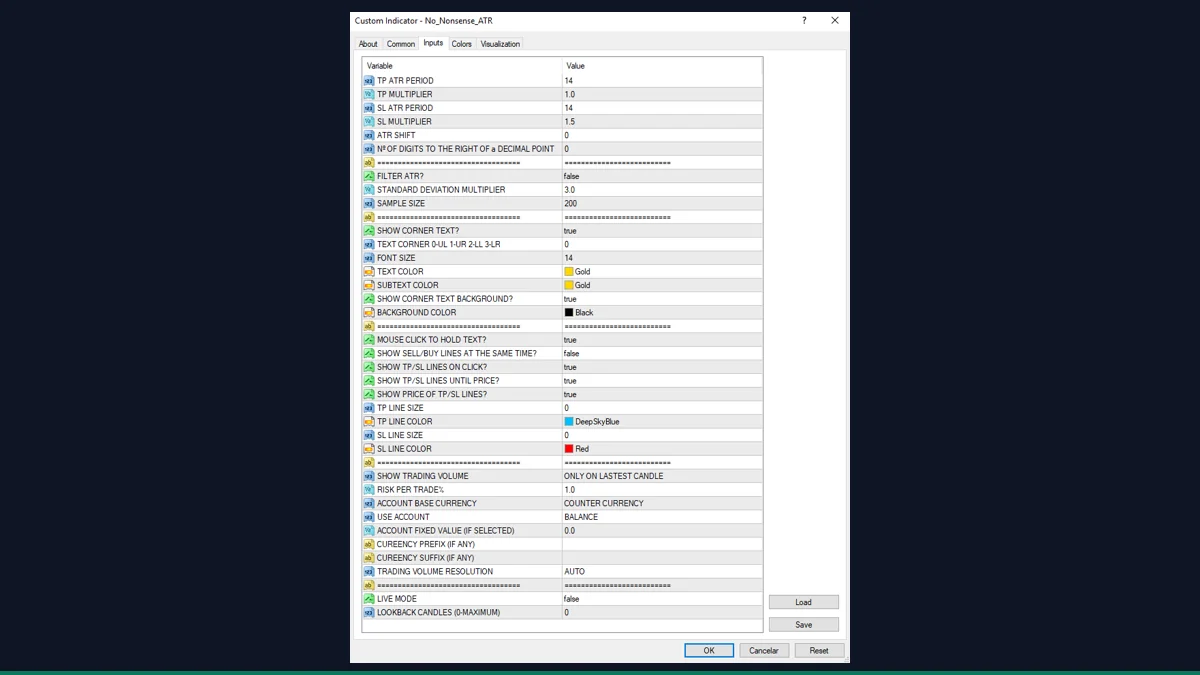
The indicator exposes a lot of inputs, but most traders only touch the ATR periods and multipliers. The values below are taken directly from the indicator file.
| Input | Default | What it controls |
|---|---|---|
| ATR_TP_PERIOD | 14 | ATR lookback used for the take-profit calculation. 14 is the NNFX standard. |
| ATR_TP_MULTIPLIER | 1 | Multiplies the ATR pip value to set target distance. 1 means your target equals one ATR. |
| ATR_SL_PERIOD | 14 | ATR lookback used for the stop-loss calculation, separate from the TP period. |
| ATR_SL_MULTIPLIER | 1.5 | Multiplies the ATR pip value to set stop distance. 1.5 gives a stop one and a half times ATR, the common NNFX setting. |
| ATR_digits | 0 | Decimal places shown for the pip readout. 0 rounds to whole pips. |
| FILTER_ATR | False | Turns on the vitelot outlier filter that screens out volatility spikes outside a standard-deviation band. |
| SD_multi | 3 | How many standard deviations wide the filter band is. Only used when FILTER_ATR is True. |
| sample_size | 200 | Number of bars the filter averages over to build its band. Only used when FILTER_ATR is True. |
| SHOW_CORNER_TEXT | True | Shows or hides the on-chart panel that displays the TP and SL pip values. |
| text_corner | 0 | Which chart corner the panel sits in: 0 upper-left, 1 upper-right, 2 lower-left, 3 lower-right. |
How do you add No Nonsense ATR to MetaTrader 4?
- Unzip the download so you can see the indicator file and any included folders.
- In MetaTrader 4, open File then Open Data Folder.
- Go into the MQL4 folder, then the Indicators folder.
- Copy the indicator file from the zip into that Indicators folder.
- If the download includes an Include or .mqh file, copy it into MQL4/Include.
- Back in MT4, right-click Navigator and choose Refresh so the indicator appears.
- Drag No Nonsense ATR onto a chart, set your ATR periods and multipliers, and click OK.
Where does No Nonsense ATR help, and where does it fall short?
What No Nonsense ATR does well, and where it falls short, with nothing hidden.
- Free and open-source under GPL-3.0, with the full .mq4 source included so you can read or modify it.
- Does the NNFX ATR-to-pips math automatically, so you stop calculating stop and target widths by hand.
- Separate periods and multipliers for stop and target give you full control over the ratio.
- Click-to-draw TP and SL lines let you see exactly where a volatility-based stop and target land before you enter.
- Reads ATR that has already formed, so the panel value for a closed bar does not change after the fact.
- Optional risk-percent position sizing converts the ATR stop into a lot size.
- It is a calculator and display, not a signal. It tells you how far to place stops and targets, not when or which way to trade.
- Only really useful if you follow an ATR-based method such as NNFX. Fixed-pip traders gain little from it.
- The pip conversion assumes a standard 5-digit/3-digit broker. On unusual symbols or quote conventions the pip figure may need sanity-checking.
- The input list is long and cluttered, with many cosmetic and position-sizing options that can overwhelm first-time users.
- The optional ATR filter adds standard-deviation smoothing that some NNFX purists prefer to leave off, so it is off by default for a reason.
- MetaTrader 4 only. There is no MT5 build of this file.
Download No Nonsense ATR free
Enter your email and we will send you No Nonsense ATR for MetaTrader 4, packaged with its original GPL-3.0 licence and a credit to HYPANTHIUM, with the ATR filter by vitelot. Come back for any of the other free tools whenever you want one.
We never share or sell your email. One-click unsubscribe in every message.
No Nonsense ATR: questions traders ask
Does No Nonsense ATR repaint?
No. It reads Average True Range from bars that have already closed, so the stop and target figure for a finished bar stays fixed. Only the live, forming bar updates as new price comes in, which is normal.
Does it place trades or give buy and sell signals?
No. It is a display and calculation tool. It shows you how wide your stop and target should be in pips based on ATR, and can draw those levels when you click, but it never opens, closes, or signals a trade.
Is it really free?
Yes. It is released under the GNU General Public License v3.0 by HYPANTHIUM, with the ATR filter contributed by vitelot. The full source is included so you can inspect or adapt it.
Will it work on MetaTrader 5?
No. This is an MT4 .mq4 indicator. It will not load in MT5 without being rewritten for that platform.
Why are my stop and target shown in whole pips with no decimals?
Because ATR_digits defaults to 0, which rounds the readout to whole pips. Increase ATR_digits if you want one or two decimal places of precision.
What do the default multipliers mean?
With the defaults, your target equals one ATR (TP multiplier 1) and your stop equals one and a half ATR (SL multiplier 1.5), which is a common NNFX configuration. Change the multipliers to suit your own rules.
Original author HYPANTHIUM released it GPL-3.0 in the file itself; redistributed with full .mq4 source + GPL notice, attributed to HYPANTHIUM (not the re-host repo owner).