MA Max Excursion Indicator for MT4
- Category
- Trend & Momentum
- Platform
- MetaTrader 4, MetaTrader 5
- Repaints?
- See the honest review below
- Licence
- Apache-2.0
- Inputs
- 10
- Price
- Free
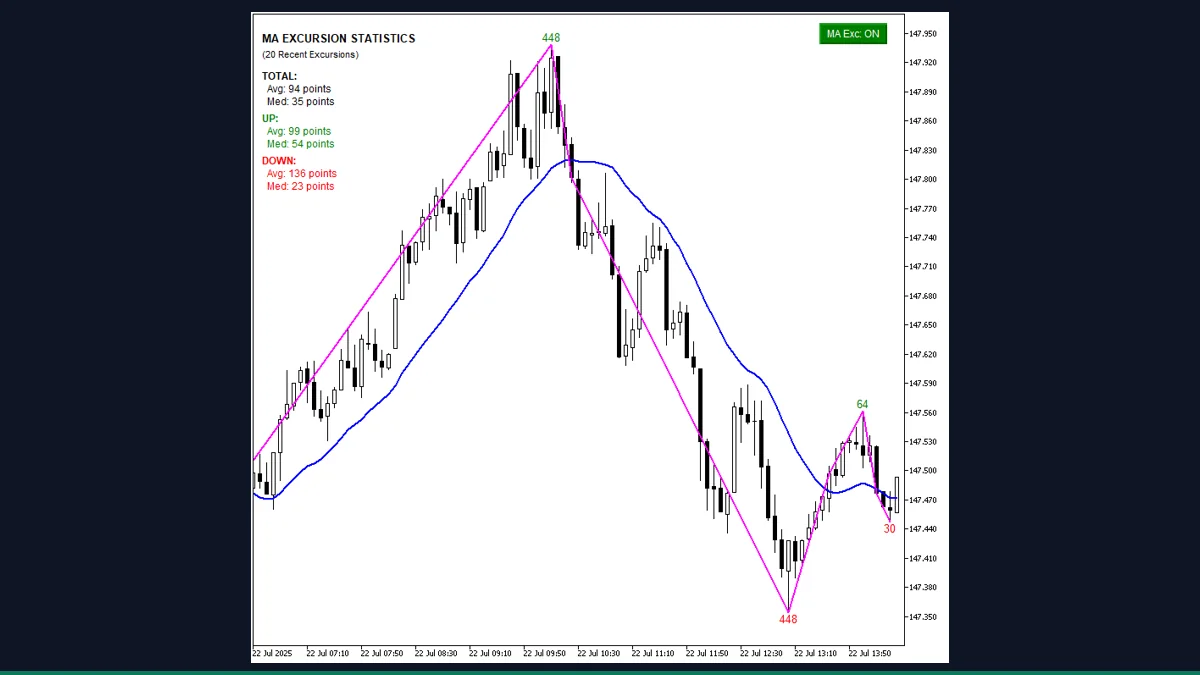
MA Max Excursion is a free MT4 and MT5 indicator from EarnForex that measures the largest distance price travels away from a moving average between two MA crosses. It marks each peak with a ZigZag line and a points label, then prints average and median excursion stats. It suits traders studying over-extension.
If you have ever wondered "how far does this pair usually stretch from its moving average before it snaps back," MA Max Excursion answers that question with measured numbers instead of eyeballing. It is a study tool, not a buy or sell signal, and it works on MetaTrader 4 and MetaTrader 5.
What is MA Max Excursion, and what does it do in MT4?
MA Max Excursion is a chart-window indicator that quantifies over-extension. Every time price crosses a moving average, a new "leg" begins. The indicator watches that leg until the next cross and records the single bar where price reached its furthest point away from the MA. That furthest distance is the maximum excursion for that leg.
It draws a yellow ZigZag connecting those excursion peaks, prints a text label on each peak showing the distance in points, and shows a small statistics box with the average and median excursion size for up legs, down legs, and all legs combined. The author is www.EarnForex.com, 2025 and it is released under the Apache-2.0 licence, so it is genuinely free to download, use, and study.
On each bar the indicator computes a moving average from your chosen period, method, and applied price, then scans the visible history for crosses where the price line and the MA swap sides. A cross up happens when price moves from at or below the MA to above it, and a cross down is the mirror case. Each cross closes the previous leg and opens a new one.
Between two consecutive crosses the indicator searches every bar for the point of greatest separation from the MA. In Absolute distance mode that separation is the raw price gap; in Relative mode it is measured proportionally so legs at different price levels are comparable. The Cross Point setting decides whether the gap is measured from the bar close or from the MA value at the cross. The winning bar gets a ZigZag node and a label such as a number followed by "points," colored green for excursions above the MA and red for those below.
When statistics are enabled the indicator collects every recorded excursion and prints the average and median for up moves, down moves, and the combined total, expressed in points. This is descriptive measurement of what price has already done. It does not forecast the next move, and it does not place orders.
Which MA Max Excursion inputs matter most?
These are the real inputs that change what the indicator measures and how the labels look. The defaults are sensible for a first run, so start there and adjust the MA period and distance mode to match the instrument you study.
| Input | Default | What it controls |
|---|---|---|
| MA_Period | 20 | Number of bars in the moving average. A shorter period reacts faster and creates more crosses and shorter legs; a longer period produces fewer, larger excursions. |
| MA_Method | MODE_SMA | How the average is calculated. SMA, EMA, smoothed, or linear weighted. EMA tracks recent price more closely, which shifts where crosses fall. |
| MA_Price | PRICE_CLOSE | Which price the MA is built from, for example close, open, median, or typical. This also affects exactly where price is judged to cross the line. |
| UseAbsoluteMode | Absolute | Distance mode. Absolute measures the raw price gap from the MA; Relative measures it proportionally so legs at different price levels can be compared fairly. |
| UseMAValueAtCross | MA_Value | Reference point for the cross. Measure the excursion from the MA value at the cross or from the close price at the cross. |
| MaxBars | 1000 | How many recent bars to process. Lower it for faster redraws on slow machines; set 0 to process the whole chart history at the cost of speed. |
| ShowStatistics | true | Shows or hides the corner box with average and median excursion sizes for up legs, down legs, and all legs combined, in points. |
| EnableAlerts | false | Master switch for alerts. With it off, no popup, email, push, or sound fires. Turn it on, then choose the alert channels below. |
| LabelColorAbove | clrLime | Color of the excursion labels for legs that peaked above the moving average. The below-MA color is set separately. |
| FontSize | 10 | Font size of the on-chart excursion distance labels. Raise it for readability on high-resolution monitors. |
How do you add MA Max Excursion to MetaTrader 4?
- Download and unzip the indicator package from the download link on this page.
- In MetaTrader 4, open File then Open Data Folder.
- Open the MQL4 folder, then the Indicators subfolder, and copy the indicator file from the zip into it.
- If the package includes any .mqh files, copy them into MQL4/Include.
- Back in MT4, right-click Navigator and choose Refresh so the indicator appears in the list.
- Drag MA Max Excursion from Navigator onto a chart, review the inputs, and click OK.
- Set MA Period and Distance Mode for your instrument, then read the labels and the statistics box.
Where does MA Max Excursion help, and where does it fall short?
What MA Max Excursion does well, and where it falls short, with nothing hidden.
- Free and open source under Apache-2.0, with the original EarnForex source code included so you can read exactly what it measures.
- Turns a vague idea of over-extension into concrete numbers, marking each excursion peak and printing average and median sizes in points.
- Works on MetaTrader 4 and MetaTrader 5, and on any symbol and timeframe.
- Relative and absolute distance modes let you compare legs fairly across instruments at very different price levels.
- Flexible alerts (popup, email, push, sound) so you do not have to stare at the chart waiting for a stretched move.
- It is a measurement and study tool, not a trading signal. It describes how far price has already moved and does not predict reversals or place trades.
- The excursion peak for the current, unfinished leg can shift as new bars form, because the furthest point is only final once the next cross prints.
- Heavy on full history. Processing all bars (MaxBars = 0) on a long chart can slow redraws on older machines, so the 1000-bar default is there for a reason.
- Output quality depends entirely on the MA settings you pick; a poorly chosen period produces crosses and excursions that tell you little.
- Distances are reported in points, so you must mentally convert to pips or price for instruments where points and pips differ.
- The statistics describe past behavior only and offer no guidance on position sizing, entries, or exits.
Download MA Max Excursion free
Enter your email and we will send you MA Max Excursion for MetaTrader 4, packaged with its original Apache-2.0 licence and a credit to EarnForex.com. Come back for any of the other free tools whenever you want one.
We never share or sell your email. One-click unsubscribe in every message.
MA Max Excursion: questions traders ask
Does MA Max Excursion repaint?
The completed legs between past crosses are fixed once the next cross prints. The excursion for the current, open leg can still change as new bars form, because the furthest point is not final until that leg closes. So treat finished legs as settled and the live leg as provisional.
Does it place trades or give buy and sell signals?
No. It is a measurement and study indicator. It marks how far price has stretched from the moving average and reports average and median sizes. It does not generate entries, exits, or orders.
Is it really free?
Yes. It is released under the Apache-2.0 licence by www.EarnForex.com, 2025, and the source code is included, so you can use, study, and modify it at no cost.
Does it work on MT5?
Yes. The package includes both an MT4 (.mq4) and an MT5 (.mq5) version. Install the file that matches your platform into the relevant Indicators folder.
What is the difference between Absolute and Relative distance mode?
Absolute mode measures the raw price gap between the bar and the moving average. Relative mode measures that gap proportionally, which lets you compare excursions across instruments or price levels that differ widely.
Why are the distances shown in points instead of pips?
The indicator reports each excursion as the price gap divided by the symbol point, labelled in points. On many 5-digit forex symbols a pip is ten points, so convert accordingly when comparing to pip-based measures.