How do you calculate lot size in MT4?
Updated 2026-06-09
Lot size in MT4 is one line of arithmetic: lots equal account balance times risk fraction, divided by stop-loss pips times pip value per lot. On a $10,000 account risking 1% with a 25-pip stop on EUR/USD, that is $100 divided by $250, or 0.40 lots, rounded down to the broker's volume step.
The lot size formula is one line of arithmetic
Fixed-fractional sizing — the method every risk-based approach boils down to — is this:
lots = (balance × risk fraction) ÷ (stop-loss in pips × pip value per 1.00 lot)
Worked on EUR/USD: a $10,000 account and a 1% risk fraction put $100 on the line. One pip on one standard lot of EUR/USD is $10 in a USD account, so a 25-pip stop is worth 25 × $10 = $250 per lot. $100 ÷ $250 = 0.40 lots. That is the whole calculation; everything else in this guide is about getting the two inputs — pip value and contract size — right for the symbol you are actually trading.
Two finishing steps before the number goes anywhere near the order ticket. First, round down to your broker's volume step (usually 0.01), never up — rounding down keeps the cash at risk at or below the figure you started from. Second, MetaTrader 4 will not do any of this for you: the order window's volume field expects a finished number, and nothing built into the platform sizes a position from a risk percent. You run the arithmetic yourself, keep a spreadsheet open, or put a small on-chart panel on the job.
One framing note: the risk fraction is a decision you make in your own plan, not something this page hands you. What follows is the arithmetic that converts a fraction you have already chosen into a volume MT4 will accept — it carries no opinion about what that fraction ought to be.
How much is a pip worth? The values you can trust
Pip value is where most lot-size mistakes live, because it is only constant for some pairs. The rule: a pip has a fixed value in the quote currency — the second one in the pair — and that value only stays fixed in your account currency when the two match.
For a USD account, any pair quoted in USD (EUR/USD, GBP/USD, AUD/USD, NZD/USD) has values worth memorising:
| Volume | Units | Pip value (USD-quoted pair, USD account) |
|---|---|---|
| 1.00 — standard lot | 100,000 | $10.00 |
| 0.10 — mini lot | 10,000 | $1.00 |
| 0.01 — micro lot | 1,000 | $0.10 |
Everything else is a conversion. On USD/JPY a pip is 0.01, so one standard lot moves ¥1,000 per pip — fixed in yen, floating in dollars. At a worked rate of 150.00 (a labelled example, not a live quote — redo it at today's rate) that is ¥1,000 ÷ 150.00 = $6.67 per pip. On a cross like EUR/GBP, a pip is worth £10 per standard lot in the quote currency, converted at the current GBP/USD rate; at a worked 1.2500 that comes to $12.50.
MT4 itself never prints a pip value anywhere in its interface — not in the order ticket, not in the Specification window. The terminal knows it internally (programs read it through tick value and tick size), which is exactly how the free Lot Size Calculator panel derives its number, including the adjustment for 5-digit and 3-digit JPY quotes where one pip equals ten of MT4's points.
For the full per-pair breakdown — non-USD accounts, USD-as-base pairs like USD/JPY, crosses, and gold and indices — see the dedicated pip value guide.
Worked examples: a JPY pair, gold, and an index
Same $10,000 account, same 1% risk fraction — $100 on the line — applied to three symbols that break the EUR/USD-only habit.
USD/JPY, 30-pip stop. Pip value is ¥1,000 per standard lot, converted at the USD/JPY rate itself. At a worked 150.00 that is $6.67, so the stop is worth 30 × $6.67 = $200 per lot, and $100 ÷ $200 = 0.50 lots. Because the conversion uses the live rate, the identical trade at 130.00 would give $7.69 per pip and 0.43 lots — JPY sizing genuinely moves with the rate, so label the rate whenever you write the math down.
Gold (XAUUSD), $5.00 stop. Skip pips entirely here — brokers disagree on whether a gold pip means $0.01 or $0.10, so work in plain price distance instead. With the common 100-ounce contract, a $1.00 move is worth $100 per 1.00 lot. $100 ÷ ($5.00 × $100) = 0.20 lots. That 100 oz figure is common, not universal — read it from the Specification window before you trust it.
An index CFD, 80-point stop. Indices vary the most: the same index can be worth different amounts per point at two brokers. If the Specification shows contract size 1 on a USD-quoted index, one point is $1 per 1.00 lot, so $100 ÷ (80 × $1) = 1.25 lots. If the contract size were 10, the same arithmetic gives 0.125, which rounds down to 0.12 lots on a 0.01 step. The formula never changes; the per-point value does.
Contract size lives in the Specification window
Every broker-side input the formula needs — contract size, digits, minimum and maximum volume, volume step — sits in one place: right-click the symbol in Market Watch (Ctrl+M if it is hidden) and choose Specification.
- Contract size — units per 1.00 lot: 100,000 for a standard forex pair, commonly 100 for gold, anything at all for an index CFD.
- Digits — how many decimals the symbol quotes with. On a 5-digit forex feed the last digit is a point and a pip is ten points; the same applies to 3-digit JPY feeds. Mixing up points and pips silently scales the result by ten — the single most expensive typo in this arithmetic.
- Minimal volume / Maximal volume / Volume step — the grid your final number must land on. Round down to the step; if the result lands below the minimum, see the honest limitation in the next section.
- Profit calculation mode — Forex, CFD, or Futures: how the broker turns price distance into money. Useful for sanity-checking oddly quoted symbols.
The exact rows can differ slightly from broker to broker, because the values are configured on the broker's server and the window simply displays what the server reports. What never differs: this is the only place in the MT4 interface that states the contract size, and the formula is wrong without it.
If you have installed a sizing tool and it shows nothing on a symbol, the Specification window is the first diagnostic stop — and if the tool never appeared in the Navigator at all, that is an install problem, not a math problem.
The formula already adjusts to balance, risk and pair
Searches like "adjust lot size according to balance" make this sound like a feature you bolt on. It is not — it is the formula doing its job. The balance term re-sizes every trade as the account changes, the pip-value term re-fits the size to every pair, and the stop term scales it to every trade shape. Recompute before each trade and all three adjustments happen on their own.
- Balance moves, size moves. After the account changes, the same 1% fraction is a different cash figure, so the lot count shifts with it. That is the entire mechanism — the same line of arithmetic run on a new balance, nothing more.
- Balance or equity is a real choice. Balance ignores open positions; equity includes floating P/L, so an open trade changes the size of the next one. MT4 shows both in the Terminal window (Ctrl+T), and the on-chart panel exposes the same choice as its
UseEquityswitch. - Different pairs, same cash at risk. The 0.40 lots on EUR/USD and 0.50 lots on USD/JPY from the examples above are the same $100 wearing different volumes. Using an identical lot size across pairs is precisely what produces uneven risk.
The honest limitation: on a small account with a wide stop, the arithmetic can return a size below the broker's minimum volume — say 0.004 lots against a 0.01 minimum. No rounding fixes that. Taking the minimum lot means the cash at risk exceeds the original fraction; that is a fact about the account-and-stop combination, and no tool can calculate it away.
Put the arithmetic on the chart
Running this by hand a few times teaches you the moving parts, but repeating it before every trade is exactly the kind of mechanical arithmetic a computer should own. The free Lot Size Calculator on this site is a small, MIT-licensed MT4 panel that does the same fixed-fractional math live on the chart: it reads your balance (or equity, via UseEquity), applies your RiskPercent and StopLossPips inputs, derives the pip value from the broker's own tick data with the 5-digit and 3-digit JPY adjustment, then snaps the result down to the broker's volume step and clamps it between minimum and maximum lot.
It is honest about its limits, and so is this page. It does not place orders — you still type the number into the ticket yourself. It sizes only the chart's current symbol, so each chart shows its own figure. And its pip detection is tuned for forex quoting conventions: on gold, indices and other CFDs, check its output against the manual arithmetic from the examples above before relying on it — the Specification-window detour takes thirty seconds.
Its colour cues are worth knowing too: the lot-size line turns orange when the result was pinned to the broker minimum and red when it hit the maximum — both mean the risk fraction and stop no longer fit the account on that symbol, which is the same limitation flagged in the section above.
If you want broader account numbers alongside it, the account-tools shelf has companions like the risk calculator that put exposure figures on the same chart.
Lot size questions, answered
How much is a pip worth on EUR/USD?
Ten dollars per pip per standard lot in a USD account, one dollar per mini lot (0.10), and ten cents per micro lot (0.01). The figure is fixed because EUR/USD is quoted in dollars, the same currency as the account. The same values hold for any USD-quoted pair, such as GBP/USD or AUD/USD. Pairs not quoted in USD need a conversion at the current exchange rate, so their pip value drifts as that rate moves.
Does MT4 calculate lot size from a risk percent automatically?
No. The MT4 order window only accepts a finished volume number; nothing built into the platform converts a risk percent and a stop distance into lots. Traders either do the arithmetic by hand, keep a spreadsheet beside the terminal, or run a free on-chart tool that reads the account and the broker's symbol data and prints the resulting lot size directly on the chart.
Why does the same risk percent give different lot sizes on different pairs?
Because pip value differs by pair. A pip on EUR/USD is worth $10 per standard lot in a USD account, while a pip on USD/JPY is worth ¥1,000 — about $6.67 at a 150.00 rate, and changing as the rate moves. The same cash at risk therefore needs a different volume on each symbol. Using one identical lot size across pairs is what actually produces uneven risk.
What if the formula gives a size below the broker's minimum lot?
Then the chosen risk fraction and stop distance do not fit the account on that symbol — a 0.004-lot result cannot be traded on a 0.01-minimum book. Taking the minimum lot means the cash at risk exceeds the original fraction; that is plain arithmetic, not a tool failure. The on-chart panel flags exactly this case by turning its lot-size line orange.
Free tools to start with
Lot Size Calculator
Risk-based position sizing on the chart: set risk percent and stop distance, read the exact lot size.
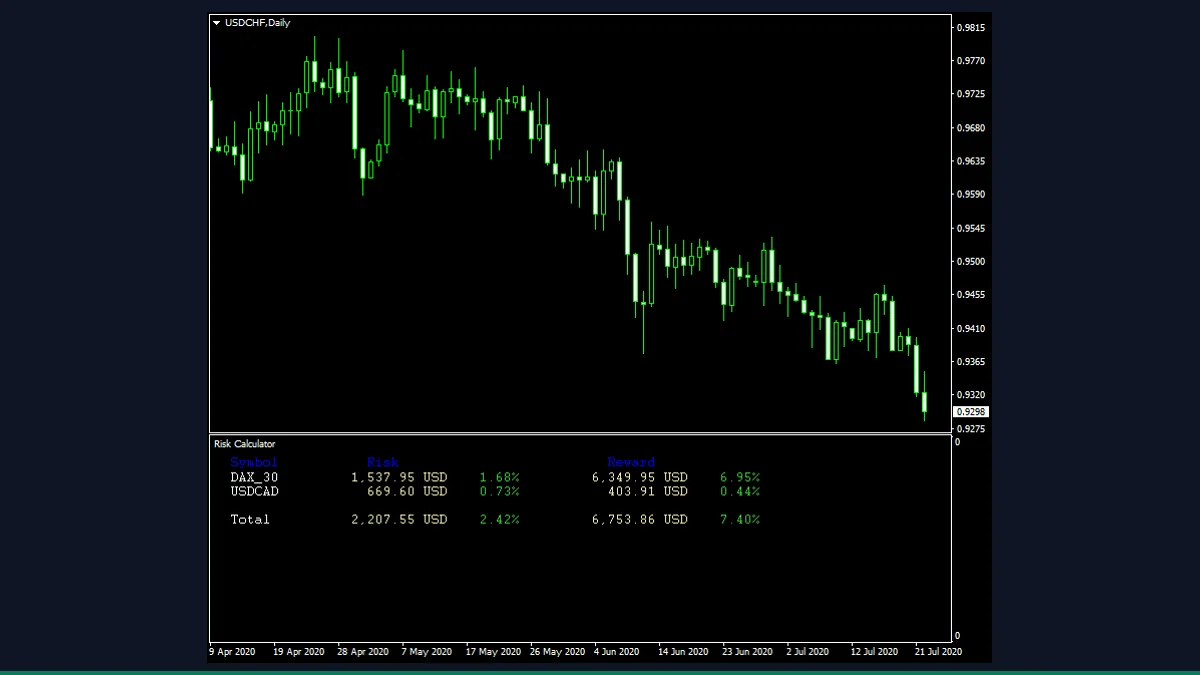
Risk Calculator
Reads your open and pending orders to show total risk and reward in both money and percent.
Trade Info Panel
An on-chart dashboard of balance, equity, floating P/L, margin and spread, all in one panel.