Price Alert Panel for MetaTrader 4
- Category
- Price & Alert Tools
- Platform
- MetaTrader 4, MetaTrader 5
- Repaints?
- No, updates on closed bars
- Licence
- Apache-2.0
- Inputs
- 8
- Price
- Free
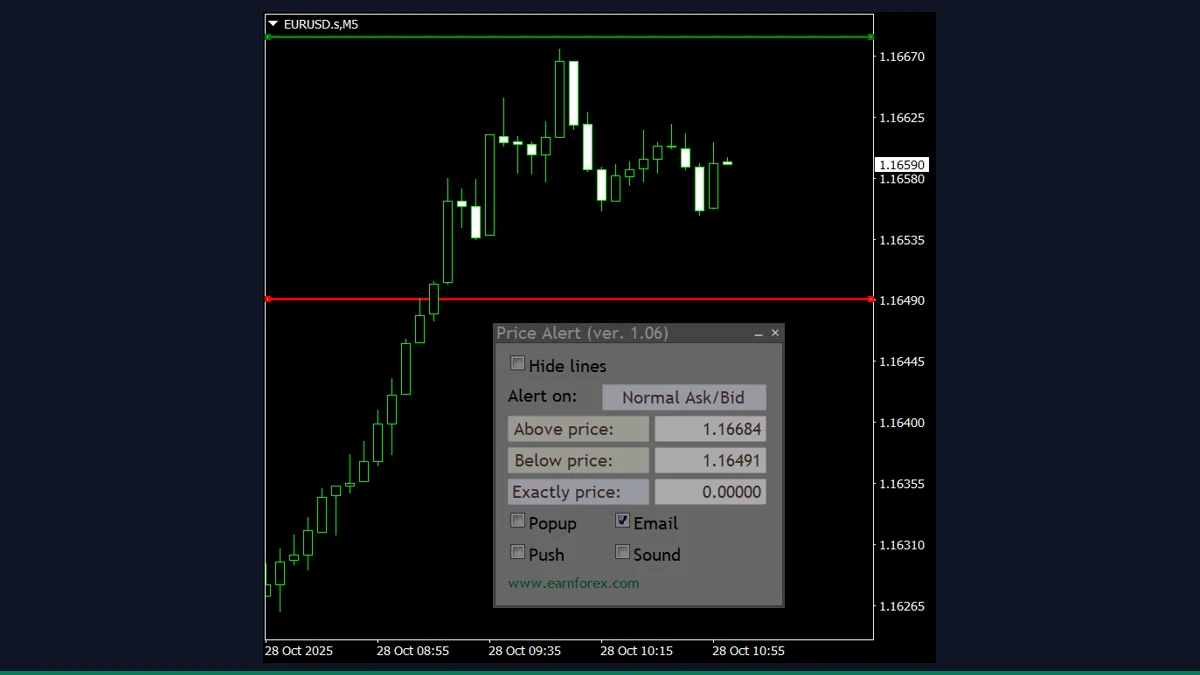
Price Alert Panel is a free MT4 and MT5 utility that lets you set "price above", "price below" and "price exactly" alerts from an on-chart panel, then fires a pop-up, email, push notification or sound when a level is hit. It is for traders who want hands-off level watching, not a trade signal.
If you are tired of staring at the chart waiting for price to reach a level, Price Alert Panel handles the watching for you. You drag three lines onto the chart, tick which notification channels you want, and it pings you the moment price crosses. It does not predict anything and it does not trade. It is an alert utility, and a clean one.
What is Price Alert Panel, and what does it do in MT4?
Price Alert Panel is a free, open-source on-chart panel for MetaTrader 4 and MetaTrader 5, published by EarnForex.com under the Apache-2.0 licence. Instead of digging through the MT4 alerts dialog, you get a small dockable panel with three editable price fields and matching horizontal lines on the chart: a green "above" line, a red "below" line and a yellow "exactly" line.
When the live price (or the previous candle's close, if you choose) reaches one of those levels, the panel triggers whichever alerts you have enabled. It is a watcher and notifier, not a strategy or a forecasting tool. The decision about what level matters, and what to do when it is hit, stays entirely with you.
On every incoming tick the indicator reads the price you select with AlertOnPrice: normal Ask/Bid, Ask only, Bid only, or the previous closed candle on a timeframe you pick. It then compares that price against the three levels you have set, which it stores and reads back from the on-chart lines so dragging a line and typing a value stay in sync.
When the chosen price crosses an enabled level, the indicator dispatches notifications through MetaTrader's standard functions: a native terminal pop-up via Alert(), an email via SendMail(), a mobile push via SendNotification(), and a sound via PlaySound(). Each channel is an independent checkbox, so you can use one, several, or all four at once. Email needs your SMTP server configured in MT4 (Tools, Options, Email) and push needs your MetaQuotes ID set on the Notifications tab, because the panel only calls those built-in functions, it does not contain its own mail or push client.
Your levels, channel choices and panel position are saved to disk, so they survive a chart reload or a terminal restart. The panel also removes duplicate copies of itself if you accidentally attach it twice to the same chart.
Which Price Alert Panel inputs matter most?
The defaults attach a working panel with all alerts off, so nothing fires until you choose your levels and tick at least one channel. These are the inputs worth knowing.
| Input | Default | What it controls |
|---|---|---|
| PriceGoesAbove | 0 | Price level for the upper (green) line. Leave at 0 and set it by dragging the line or typing in the panel instead. |
| PriceGoesBelow | 0 | Price level for the lower (red) line. Same idea as above, 0 means not set yet. |
| PriceIsExactly | 0 | An exact price level (yellow line) that fires when price touches it precisely. More finicky than above/below, since price has to hit it exactly. |
| NativeAlert | false | Turn on the standard MT4 pop-up alert window when a level triggers. |
| SendEmail | false | Send an email on trigger. Requires your SMTP server set up in MT4 Options, Email. |
| SendPush | false | Send a push notification to the MetaTrader mobile app. Requires your MetaQuotes ID on the Notifications tab. |
| SendSound | false | Play a sound file when a level triggers. |
| AlertOnPrice | NormalAskBid | Which price to compare: normal Ask/Bid, Ask only, Bid only, or the previous candle close. |
| ClosePriceTimeframe | PERIOD_CURRENT | Timeframe used for the previous-close price when AlertOnPrice is set to Previous Close. |
| DarkMode | false | Switch the panel to a darker, less bright colour scheme for dark chart themes. |
How do you add Price Alert Panel to MetaTrader 4?
- Download and unzip the Price Alert Panel package from the link on this page.
- In MetaTrader 4, click File, then Open Data Folder.
- Open the MQL4 folder, then the Indicators folder, and copy the indicator file from the zip into it.
- If the package includes any .mqh files or a Files/Images folder, copy them into the matching MQL4 subfolders (Include, Files, Images).
- Back in MT4, right-click the Navigator panel and choose Refresh so the indicator appears under Indicators.
- Drag Price Alert Panel onto the chart and symbol you want to watch, then click OK.
- Set your levels by dragging the lines or typing values, tick the notification channels you want, and confirm SMTP/MetaQuotes ID are configured if you use email or push.
Where does Price Alert Panel help, and where does it fall short?
What Price Alert Panel does well, and where it falls short, with nothing hidden.
- Three alert types (above, below, exactly) on one chart, all set visually by dragging lines or typing values.
- Four independent notification channels: terminal pop-up, email, push to mobile, and sound. Use any combination.
- Settings and levels persist to disk, so they survive chart reloads and terminal restarts.
- Free and open-source under Apache-2.0, so you can read or modify the code, and the same build works on MT4 and MT5.
- Choice of which price to watch (Ask/Bid, Ask only, Bid only, or previous candle close) adds useful precision.
- Auto-removes duplicate panels and includes a dark-mode option for cleaner chart setups.
- It is an alert tool, not a signal or strategy. It tells you when a level is hit, it does not tell you the level is worth trading or which way to go.
- Email and push do not work until you separately configure your SMTP server and MetaQuotes ID in MT4. The panel cannot do that for you.
- Alerts only fire while the terminal is running and receiving ticks. Close MT4 or lose connection and nothing is watched.
- The lines are per-chart, so you set levels symbol by symbol rather than across a whole watchlist at once.
- The 'exactly' alert needs price to touch the level precisely, which can be missed on fast or gappy moves.
- Sound alerts depend on a .wav file being present in the terminal's Sounds folder.
Download Price Alert Panel free
Enter your email and we will send you Price Alert Panel for MetaTrader 4, packaged with its original Apache-2.0 licence and a credit to EarnForex.com. Come back for any of the other free tools whenever you want one.
We never share or sell your email. One-click unsubscribe in every message.
Price Alert Panel: questions traders ask
Does Price Alert Panel repaint?
No. It does not draw historical signals that change, it simply compares the current price to the levels you set and fires an alert when one is crossed. There is nothing to repaint.
Does it place trades or manage orders?
No. It is purely an alert utility. It never sends orders, sets stops, or touches your account. When a level is hit it notifies you, and the trading decision is entirely yours.
Is it really free?
Yes. It is published by EarnForex.com under the Apache-2.0 open-source licence, so you can use it, read the source, and modify it at no cost.
Why are my email or push alerts not arriving?
The panel only calls MetaTrader's built-in functions. Email needs your SMTP server configured under Tools, Options, Email, and push needs your MetaQuotes ID entered on the Notifications tab. Without those set, the terminal cannot send them.
Does it work on MT5?
Yes. The package includes an MT5 version alongside the MT4 build, with the same panel and alert features.
Do alerts fire if my computer or MetaTrader is closed?
No. Alerts are evaluated on incoming ticks while the terminal is open and connected. If MT4 is closed or offline, nothing is being watched. For 24/7 monitoring you would run it on an always-on machine or VPS.