Price Line Alert Indicator for MetaTrader 4
- Category
- Price & Alert Tools
- Platform
- MetaTrader 4, MetaTrader 5
- Repaints?
- No, updates on closed bars
- Licence
- Apache-2.0
- Inputs
- 2
- Price
- Free
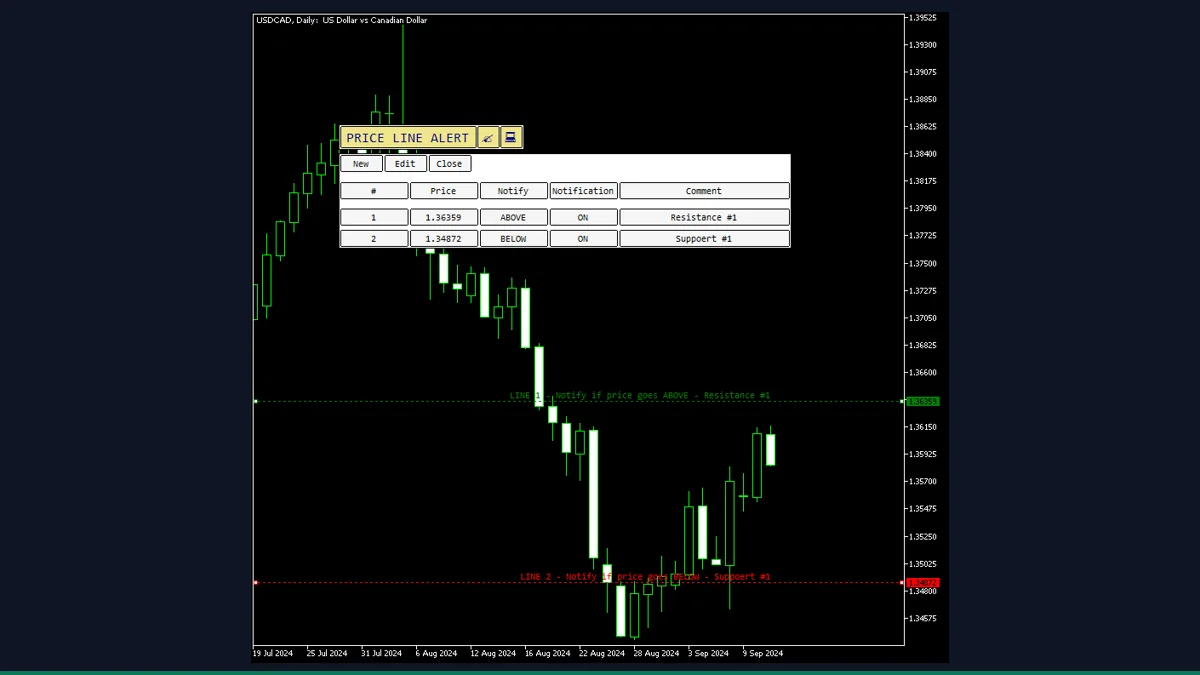
Price Line Alert is a free MT4 line alert indicator from EarnForex.com that lets you drop horizontal lines on a chart and get a popup, push, or email alert when price reaches each one. It needs no Expert Advisor. Useful for any trader watching key levels who does not want to stare at the screen.
If you trade off horizontal levels and just want MetaTrader to ping you when price arrives, Price Line Alert does exactly that and nothing more. You add a line, choose whether it should fire when price comes from above or below, and pick how you want to be notified. It is a free, open-source alert utility, not a signal generator.
What is Price Line Alert, and what does it do in MT4?
Price Line Alert is a free MetaTrader 4 indicator by EarnForex.com that turns horizontal lines on your chart into price alerts. Instead of writing an Expert Advisor or babysitting a level, you place a line at any price, mark it as an ABOVE or BELOW trigger, and the indicator watches the current price for you. When the level is reached it raises a terminal popup and, if you switch them on, a mobile push notification and an email.
It runs from a small on-chart control panel, so you manage all your lines from one place. This is a notification tool. It does not analyze the market, predict direction, or place orders. It simply tells you the moment price hits a level you chose yourself.
The indicator draws horizontal line objects (OBJ_HLINE) on your chart, each tagged internally as an ABOVE or BELOW line. On every price update it compares the current bar's close against each active line. An ABOVE line fires when the close moves above its price, and a BELOW line fires when the close moves below its price. Once a line has fired, it is marked as triggered so it does not keep repeating on the same level.
When a line triggers, the indicator calls MetaTrader's native notification functions: a terminal Alert() popup always shows, and if you enable them it also sends a mobile push via SendNotification() and an email via SendMail(). Mobile and email require the matching setup in Tools then Options then Notifications/Email. A small DPI-aware control panel lets you add lines, flip a line between above and below, and toggle each line's alert on or off. Because the check uses the current price rather than rewriting history, the lines and their state do not repaint.
Which Price Line Alert inputs matter most?
These are the real inputs from the indicator. Most traders only touch the three notification toggles and maybe the colors. The rest control the panel and line appearance.
| Input | Default | What it controls |
|---|---|---|
| SendAlert | false | Turns on the terminal popup and sound alert when a line is reached. Leave on if you want the on-screen notification. |
| SendApp | false | Sends a push notification to the MetaTrader mobile app. Requires your MetaQuotes ID set in Tools then Options then Notifications. |
| SendEmail | false | Sends an email when a line fires. Requires a working SMTP setup under Tools then Options then Email. |
| LineColorAbove | clrGreen | Color of an armed line set to fire when price moves above it. Helps you read direction at a glance. |
| LineColorBelow | clrRed | Color of an armed line set to fire when price moves below it. |
| LineColorOFF | clrGray | Color of a line whose alert is switched off, so disabled levels stay visible but muted. |
| LineStyle | STYLE_DOT | Drawing style of the lines (dotted, solid, dashed). Cosmetic only. |
| DrawLabels | true | Shows a text label next to each line. Turn off for a cleaner chart. |
| IndicatorName | PLA | Prefix for all objects the indicator creates. Change it only if you run more than one copy and need to keep their objects separate. |
| FontSize | 8 | Font size of the control panel text. Bump it up on high-resolution screens. |
How do you add Price Line Alert to MetaTrader 4?
- Download and unzip the indicator package from this page.
- In MetaTrader 4, open File then Open Data Folder.
- Copy the indicator file from the zip into MQL4/Indicators.
- Copy the included .mqh file from the zip into MQL4/Include so the indicator compiles.
- Back in MT4, right-click the Navigator panel and choose Refresh.
- Drag the indicator from Navigator onto any chart and click OK.
- Use the on-chart panel to add a line, set its direction, and turn on the notification channels you want.
Where does Price Line Alert help, and where does it fall short?
What Price Line Alert does well, and where it falls short, with nothing hidden.
- Free and open source under the Apache-2.0 license, with the full MQL4 source included.
- No Expert Advisor required, so it works on accounts or brokers where EAs are restricted.
- Three notification channels in one tool: terminal popup, mobile push, and email.
- Per-line direction control lets you arm a level to fire only from above or only from below.
- Lines and their triggered state do not repaint, so the alert reflects a real touch.
- Works on MetaTrader 4 and, via the included MT5 build, on MetaTrader 5.
- It is an alert utility, not a strategy. It does not tell you when or what to trade, only that a level you picked was reached.
- The trigger checks the current bar's close, so a fast wick that pierces and snaps back may pass before a close confirms it.
- Mobile and email alerts depend on you correctly configuring MetaTrader's Notifications and Email settings; the indicator cannot fix a missing MetaQuotes ID or SMTP.
- Alerts only fire while the terminal is running and the indicator is on the chart, so a closed platform means no notification.
- The small on-chart control panel takes a moment to learn and can crowd a busy chart.
- Each line watches only its own symbol and chart, so you need a copy on every chart you want covered.
Download Price Line Alert free
Enter your email and we will send you Price Line Alert for MetaTrader 4, packaged with its original Apache-2.0 licence and a credit to EarnForex.com. Come back for any of the other free tools whenever you want one.
We never share or sell your email. One-click unsubscribe in every message.
Price Line Alert: questions traders ask
Does Price Line Alert repaint?
No. The lines and their triggered state are based on the current price, not on rewriting past bars, so an alert reflects a real touch of the level you set.
Does it place trades for me?
No. It is purely a notification tool. It draws lines and sends alerts when price reaches them, but it never opens, closes, or modifies any orders.
Will it work on MetaTrader 5?
Yes. The download includes a separate MT5 build (.mq5) alongside the MT4 version, so you can use it on either platform.
Is it really free?
Yes. It is released by EarnForex.com under the Apache-2.0 license, and the full source code is included in the download.
Why am I not getting mobile or email alerts?
Those channels are off by default and rely on MetaTrader's own setup. Enable SendApp and SendEmail, then add your MetaQuotes ID under Tools then Options then Notifications, and configure SMTP under the Email tab.
Do alerts still fire if I close MetaTrader?
No. The indicator only runs while the terminal is open and it is attached to the chart. Closing the platform stops all alerts.