Switch Timeframes by Keys for MetaTrader 4
- Category
- Chart & Terminal Tools
- Platform
- MetaTrader 4, MetaTrader 5
- Repaints?
- No, updates on closed bars
- Licence
- Apache-2.0
- Inputs
- 14
- Price
- Free
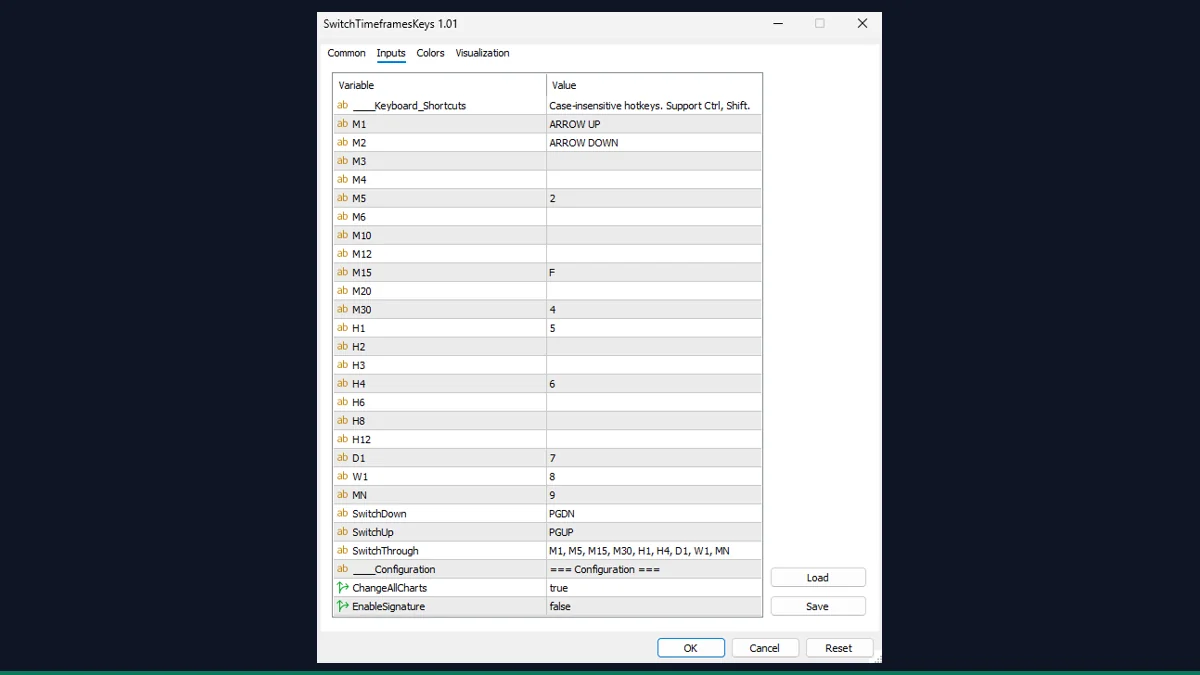
Switch Timeframes by Keys is a free MT4 utility that maps keyboard shortcuts to chart periods. Press 1 to 9 to jump straight to M1 through MN, or use Z and X to cycle down and up through a list you define. It is for any MT4 trader who switches periods constantly and wants to skip the toolbar.
If you flip between periods dozens of times an hour, clicking the timeframe toolbar gets old fast. Switch Timeframes by Keys assigns a keyboard shortcut to each MT4 chart period so you can jump straight to M1, H1, D1 and the rest with a single keypress, or cycle through your chosen list with two keys. It does not analyze price or trade. It only changes the period of your chart.
What is Switch Timeframes by Keys, and what does it do in MT4?
Switch Timeframes by Keys is a chart utility indicator from EarnForex, released under the Apache-2.0 licence. Despite being an indicator file, it draws nothing on your price chart and produces no buy or sell information. Its only job is to listen for the keys you press while the chart is focused and switch the chart to the matching timeframe.
Out of the box it follows the convention many traders already expect: 1 for M1, 2 for M5, 3 for M15, 4 for M30, 5 for H1, 6 for H4, 7 for D1, 8 for W1 and 9 for MN. The Z key cycles one timeframe down and X cycles one up. Every shortcut is an input you can remap, and you can optionally apply each switch to all open charts at once.
The tool attaches to a chart and handles MetaTrader's keyboard event. When a key is pressed and the chart has focus, the indicator reads the key code, checks whether the configured Ctrl or Shift modifier state matches, and if the key matches one of your assignments it calls MT4's own ChartSetSymbolPeriod to change the chart period. That is the same internal call MT4 uses when you click the toolbar, so the switch is native and instant, with no redraw of indicators beyond what a normal period change already triggers.
The cycle keys (Z and X by default) walk through the ordered list in the SwitchThrough input. Down and up are based on the order you list, wrapping around at the ends, so you can build a custom sequence such as M5, M15, H1, H4 and skip the periods you never use. Hotkeys are case-insensitive and accept modifier combinations like Ctrl+1 or Shift+X, plus named keys such as Tab, Esc and the arrow keys.
When ChangeAllCharts is enabled, each switch loops through every open chart in the terminal and changes them too, which is handy for multi-chart layouts. The optional signature is a tiny grey STK label in the lower-left corner that simply confirms the tool is loaded. It places no orders and reads no market data.
Which Switch Timeframes by Keys inputs matter most?
Every shortcut is a text input, so you can remap any key, add a Ctrl or Shift modifier, or clear a field to disable that shortcut. These are the inputs you will actually touch.
| Input | Default | What it controls |
|---|---|---|
| M1 | 1 | Key that switches the chart to the M1 (1-minute) period. Remap or clear to disable. |
| H1 | 5 | Key that switches the chart to the H1 (1-hour) period. |
| D1 | 7 | Key that switches the chart to the D1 (daily) period. |
| SwitchDown | Z | Cycles one step down through the SwitchThrough list, wrapping at the bottom. |
| SwitchUp | X | Cycles one step up through the SwitchThrough list, wrapping at the top. |
| SwitchThrough | M1, M5, M15, M30, H1, H4, D1, W1, MN | The ordered list the Z and X cycle keys step through. Trim it to only the periods you use. |
| ChangeAllCharts | false | When true, applies every switch to all open charts in the terminal, not just the active one. |
| EnableSignature | true | Shows a small grey STK label in the lower-left corner to confirm the tool is running. Set false to hide it. |
How do you add Switch Timeframes by Keys to MetaTrader 4?
- Download and unzip the tool, then locate the indicator file from the zip.
- In MetaTrader 4, open File then Open Data Folder.
- Open MQL4, then the Indicators folder, and copy the indicator file into it.
- Back in the terminal, right-click Indicators in the Navigator panel and choose Refresh.
- Drag the tool from the Navigator onto any chart, allow it in the dialog, and click OK.
- Click the chart so it has focus, then press a number key (for example 1 for M1) or Z and X to cycle.
- Optionally double-click the chart name, open Inputs, and remap any shortcut or enable Change All Charts.
Where does Switch Timeframes by Keys help, and where does it fall short?
What Switch Timeframes by Keys does well, and where it falls short, with nothing hidden.
- Single keypress jumps straight to any period, far faster than the toolbar for frequent switchers.
- Every shortcut is fully remappable, with Ctrl and Shift modifiers and named keys like Tab and the arrows.
- Z and X cycle through a custom, trimmable list so you can skip periods you never trade.
- Optional all-charts mode switches your whole layout at once.
- Uses MT4's native period switch, so it is lightweight and adds no chart clutter.
- It is a convenience utility, not an analysis tool. It does not predict price, generate signals, or place trades.
- The shortcut only fires when the target chart has focus, so it will not switch a chart you are not clicked into.
- Default number keys can collide with object hotkeys or other key-driven tools if you run several at once.
- You must attach it to each chart you want to control individually (unless you use the all-charts option), and the active chart still needs focus to receive the keypress.
- The list-based cycle order is only as useful as the SwitchThrough list you configure, so the defaults may not match your workflow until edited.
Download Switch Timeframes by Keys free
Enter your email and we will send you Switch Timeframes by Keys for MetaTrader 4, packaged with its original Apache-2.0 licence and a credit to EarnForex.com. Come back for any of the other free tools whenever you want one.
We never share or sell your email. One-click unsubscribe in every message.
Switch Timeframes by Keys: questions traders ask
Does this indicator repaint?
There is nothing to repaint. It draws no lines, arrows, or values on price. It only changes your chart's timeframe when you press a key, so the repaint question does not apply to it.
Does it place trades or give buy and sell signals?
No. It is purely a navigation utility. It does not analyze the market, generate signals, or send any orders. The only thing it changes is the period of your chart.
Is it really free?
Yes. It is released by EarnForex under the Apache-2.0 licence, which allows free use and redistribution. MT4 Indicator Central did not author it; full credit goes to Copyright © 2025, www.EarnForex.com.
Can I change the default keys?
Yes. Every shortcut is a text input. You can assign any key, add Ctrl or Shift (for example Ctrl+1), use named keys like Tab or the arrow keys, or clear a field to disable that shortcut.
Will it switch all my charts at once?
Only if you set ChangeAllCharts to true. With that enabled, each keypress applies to every open chart in the terminal. Left at the default false, it only affects the chart that has focus.
Does it work on MetaTrader 5?
Yes. The download includes an MT5 version alongside the MT4 file, so it runs on both platforms.